
API credentials
An integration authenticates as the company space, not as a person. The credentials it uses are issued here, under organisation settings.
Issuing one
Section titled “Issuing one”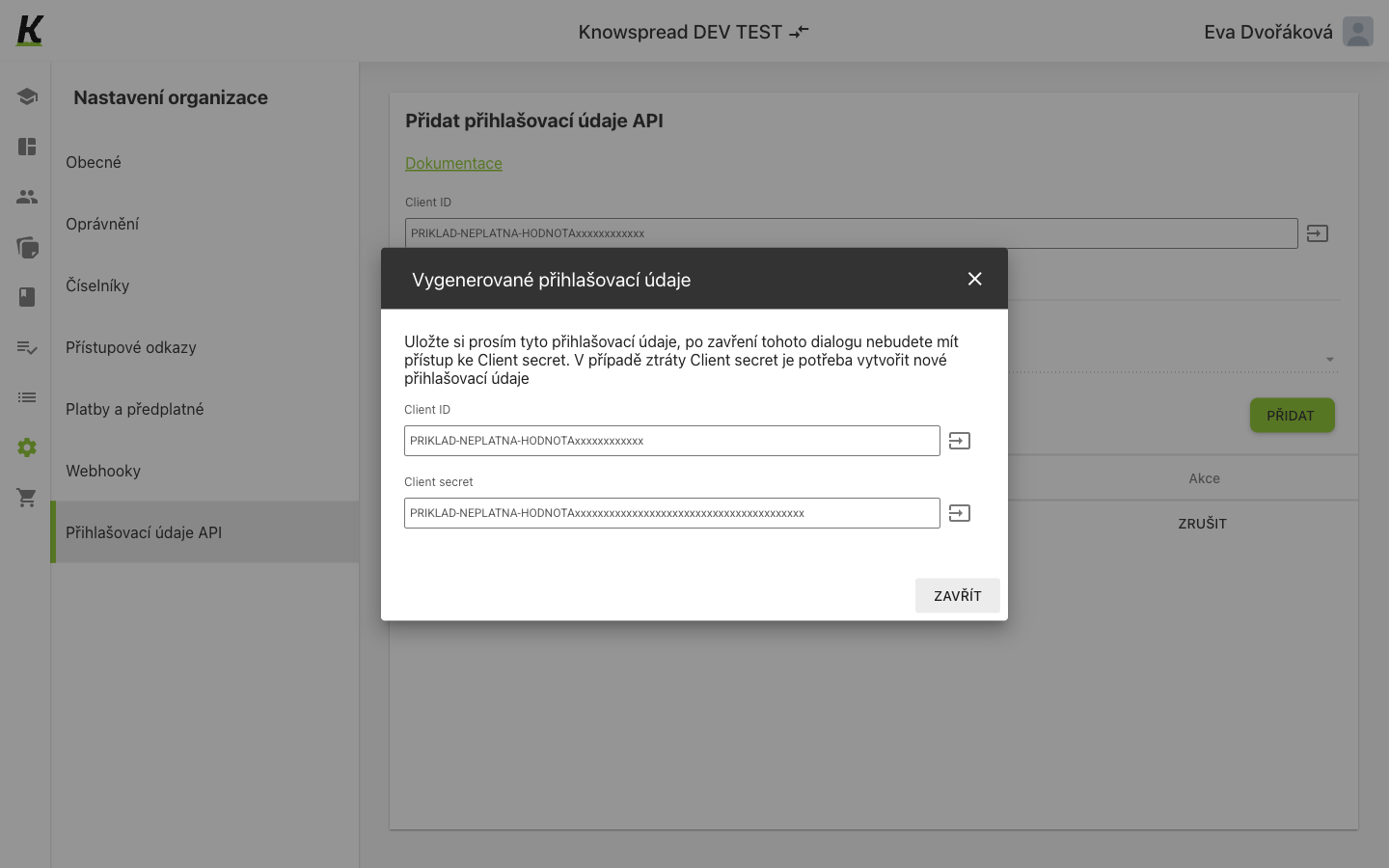
- (1) Give the credential a name, choose the API version and select Přidat. The dialog appears immediately, carrying the Client ID.
- (2) Below it is the Client secret. Both have a copy button.
- (3) Zavřít dismisses the dialog — and that is the moment the secret becomes unavailable.
The secret is shown once
Section titled “The secret is shown once”The dialog says so plainly: after it closes you no longer have access to the Client secret, and losing it means creating a new credential. Copy it before closing.
The space has a Client ID of its own, visible on the screen even before any credential exists. The ID identifies the space; the secret is what each issued credential adds.
Removing a credential is a revoke, not a delete — the action
calls POST /api/v1/company_spaces/api_credentials/{id}/revoke.
What the credential is for
Section titled “What the credential is for”The credential is a key that belongs to the space, not to a person. Your system presents it, receives a token and from then on can query the REST API on its own, without signing in as any particular person.
Where that helps:
- The HR system gets a key of its own. An HR system is to talk to the space through the REST API. You issue it a credential named after the system and hand the Client ID and Client secret pair to its administrator. The integration signs in as the space, not as one of your people.
- The colleague who set the integration up leaves. The credential belongs to the space, not to them. Removing their account does not stop the integration, and the connected system keeps running without anyone having to wire it up again on Monday morning.
- One credential per system. Alongside the HR system you connect the intranet, and each gets its own named credential. When you retire one system or its secret gets out, you revoke that credential alone and the other integrations are untouched.
- The secret is lost. Someone closed the dialog before copying the Client secret. There is nothing to recover: you issue a new credential and revoke the old one.
Technically it is always the same exchange: the pair is traded for a token and the system calls the REST API with it. The details follow.
The pair is what POST /rest/v1/auth/token expects as client_id
and client_secret. It returns a bearer token for the REST API — see
authentication for the exchange itself.
The credential belongs to the company space, so it carries the space’s access rather than any one person’s. Removing a colleague’s account does not revoke it.
In a personal space this screen shows Nemáte žádné přihlašovací
údaje because GET /api/v1/company_spaces/api_credentials answers 403 — an
empty state standing in for a refusal. See access links
for the same pattern.