
Access links
An access link is how people join a company space without being invited one at a time. You create a link, attach the plans new arrivals should land in, and send it out. Anyone who opens it registers straight into the space.
What access links are good for
Section titled “What access links are good for”Inviting people one at a time makes sense for a handful of colleagues. When a whole group starts or people keep arriving, it is easier to open one door and let them walk through on their own. An access link is that door: whoever opens it is in the space.
A few situations where a link saves work:
- A whole shift starts at once. A company hires twenty people for a new line. Instead of twenty invitations you create one link with the onboarding plan attached and the shift lead posts it in the group chat. Whoever opens it registers straight into the space and lands in the plan.
- A different link for a different group. Temporary workers need only safety training, permanent staff the full onboarding plan. You create two links, each with different plans, and hand them out separately. Each group gets its plans at registration.
- A link spread further than it should. The link from a recruitment e-mail turns up on a public forum. You close it with the switch on its row; the row stays, so you keep the record of it.
Every link is also a credential: whoever holds it gets in, with no invitation and no approval step. That is why it pays to give each group its own link and to switch off one no longer needed, as the rest of this page describes.
The screen
Section titled “The screen”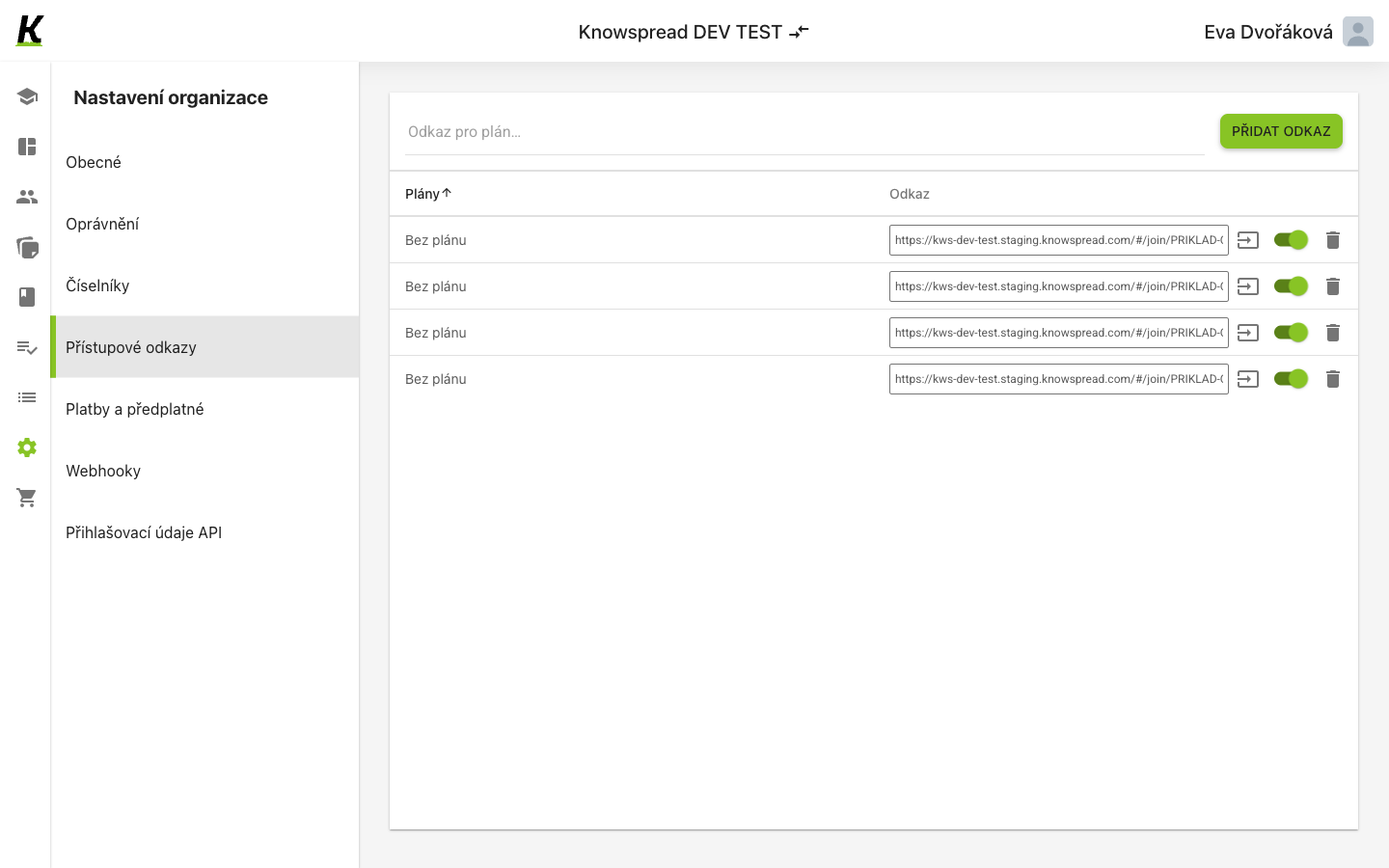
- (1) Přístupové odkazy is the fourth entry in organisation settings.
- (2) Creating one is a single step, not a dialog: name the plans in the field and select Přidat odkaz. A link with no plan attached shows as Bez plánu.
- (3) Each row carries the link itself, then a copy action, a switch that turns the link on or off, and a delete action.
One link for several plans
Section titled “One link for several plans”A link does not have to lead into a single plan. Whoever comes in through it gets all of its plans at once.
- Click into the Odkaz pro plán… field and pick the first plan.
- Pick the next plan. Each plan you pick shows in the field as a separate tag and drops out of the suggestions, so you cannot add it twice.
- Select Přidat odkaz.
The new link appears in the list with its plans named one after another, separated by commas, in the Plány column. While you are picking plans in the field, the list below shows only the links that contain all of them. That makes it easy to see whether you already have such a link.
There is no limit on the number of plans in one link. A link has no expiry and no usage limit either: it works until you switch it off or delete it.
The same combination of plans does not get a second link. Přidat odkaz returns the one that already exists, even if it is switched off.
The plans of an existing link cannot be changed on this screen. When you need a different combination, create a new link and switch the old one off. A change would not reach people who have already joined through the link anyway: plans are handed out only at the moment of registration.
What happens to the new arrival
Section titled “What happens to the new arrival”Whoever registers through the link becomes an ordinary user of the space and lands in all of the link’s plans at once. After registering, the application greets them with “Vítejte v Knowspreadu!” and opens their list of assigned courses. When a link has many plans, the courses may appear after a short delay.
Deadlines count from the moment the person is added to the plan, that is from registration. Each plan counts its own deadline.
When the same content is in several of the link’s plans with different deadlines, the person has it only once and the nearest deadline applies. That is the deadline the application shows them and sends reminders by. Different content in different plans simply adds up; there is no conflict.
When someone who is already in the space opens the link, they are added to the plans they are not in yet. Their role does not change.
Registration through a link is still bound by the space’s rules: the user limit and the number of free licences. Content that has run out of licences is not assigned to the new arrival.
Treat each link as a credential
Section titled “Treat each link as a credential”The link is the whole authorisation. It carries a token, and anyone holding it joins the organisation — no invitation, no approval step.
The switch on each row is what makes a link revocable. Turning it off leaves the row in place, so a link that has spread further than intended can be closed without losing the record of it.
What to watch for
Section titled “What to watch for”In a personal space this screen refuses instead of working, and it
shows the refusal as Nenalezen žádný přístupový odkaz — an empty state rather
than an error. The list is not empty; GET /api/v1/company_spaces/invitation_links
answered 403. API credentials behaves the same way.